Procedural Building
- Houdini
- Programming, Modeling
Technical Guide
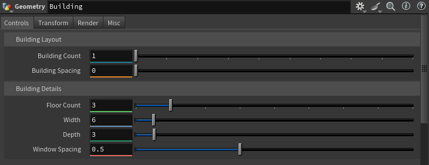
In the building geometry node, under the Controls tab, there are two main categories with a total of six adjustable parameters. For the building cluster, the controls include the number of buildings and the spacing between them. For individual buildings, the controls include the number of floors, building width, building depth, and window spacing.
Building Count: Controls how many buildings are generated in the scene.
Building Spacing: Adjusts the distance between each building in the scene.
Floor Count: Determines the number of floors for each building. Window types alternate between odd and even floors.
Width: Controls the width of an individual building. The system automatically adjusts the number and placement of windows, alternating between two types to minimize gaps along the facade.
Depth: Controls the depth of an individual building.
Window Spacing: Adjusts the distance between windows on the building facade. The system updates window count and placement based on available width.